· 14 min read
How to Coordinate Marketing Timelines When Multiple Events Happen Each Quarter
Friday's show still has tickets to sell, and next month's event is ready to announce. Both need an email. Meanwhile, your team is making ads for another date and trying to decide what goes on Instagram tomorrow.
Each event's plan looks sensible on its own. Put them together and the same person can receive a launch email, a last-minute offer and an automated follow-up in one afternoon. Your team is busy, but your events are competing with each other for attention.
You can promote several events at once. It gets easier when you know where their audiences overlap and what each event needs this week. This guide shows how to make those decisions, with real examples from Chichester Festival Theatre and SFJAZZ, plus a worked example of a busy week.
Keep each event's plan, then look at them together
You still need a marketing timeline for each event. A festival that people travel to may need months of promotion. A regular local comedy night may sell on a different schedule. The quarterly plan helps you see what happens when those schedules meet.
Imagine a venue running comedy, live music and family shows. Someone who bought a comedy ticket isn't automatically interested in a children's matinee. Two comedy nights, however, may be asking the same buyer to choose between dates. Those are different marketing decisions, even if all three events happen in the same week.
Don't assume everyone buys at the last minute either. In Loopyah's November 2025 survey of 500 US attendees, 32.6% said they usually bought tickets a month or more ahead. Use your own sales history to decide when each show needs promotion. A neat calendar is useful only if it fits how your customers book.
Step 1: Put the whole quarter on one calendar
Give each event a row. Mark when you'll announce it, when tickets go on sale, any planned news or offers, and the final sales push. Include events just outside the quarter if their campaigns overlap with it. Then add the work behind those dates, such as getting artwork approved, checking ticket links and preparing emails.
Mark fixed dates first. Artist announcements, ticket releases and sponsor commitments may already be agreed. Plan around them before choosing the dates you can move.
Add the audience to each major email or campaign. Two announcements can run together if they reach different people. If both need the same audience, consider spacing them out or putting them in one useful message.
Check who is doing the work. If the same designer owes you three videos on Thursday, moving an email to Friday hasn't solved the production problem. Set preparation and approval dates in your event marketing plan.
Give someone responsibility for the shared calendar. That person checks new requests against the other events and resolves conflicts before work starts. Your event announcement needs a confirmed offer and working ticket page as well as a date.
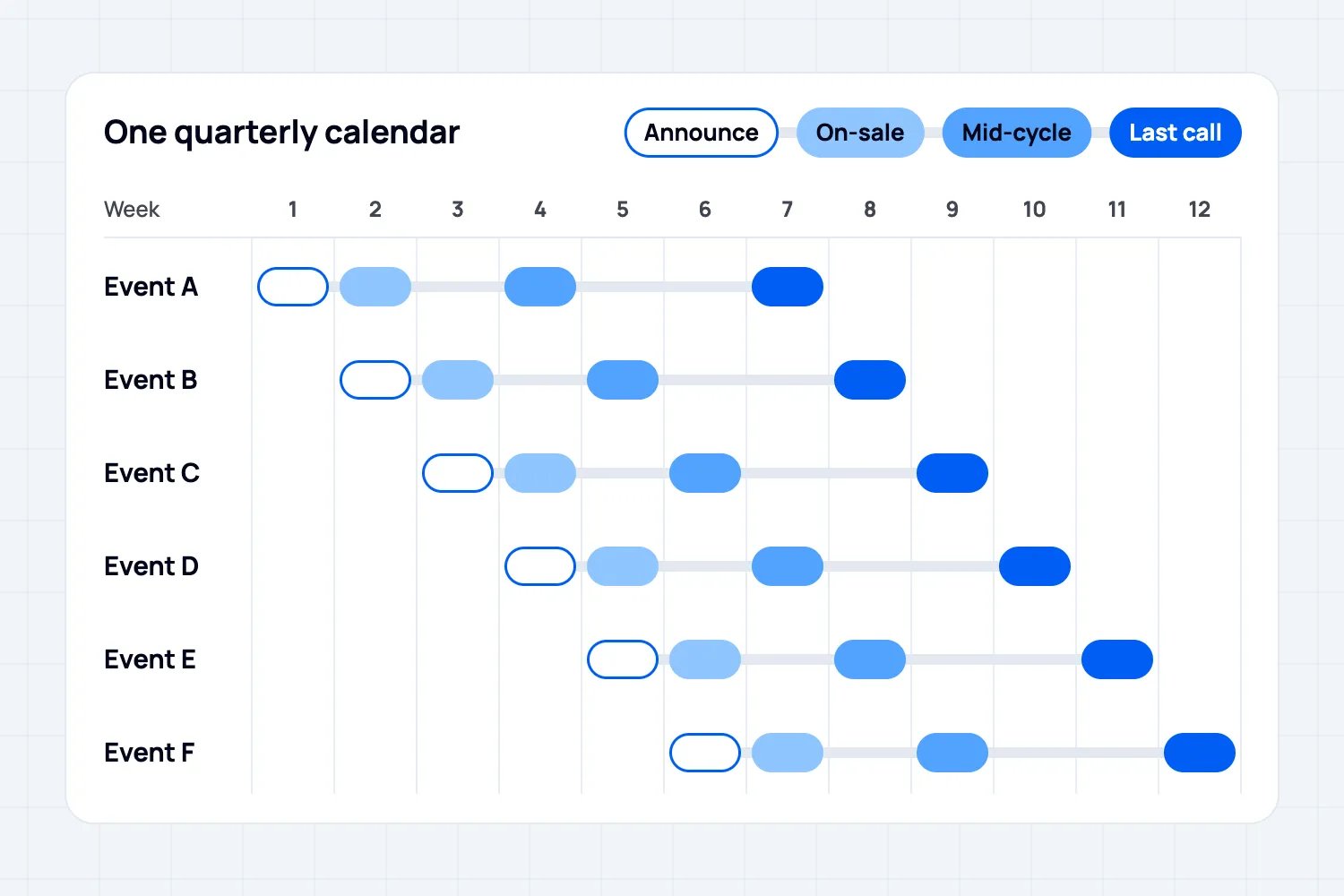
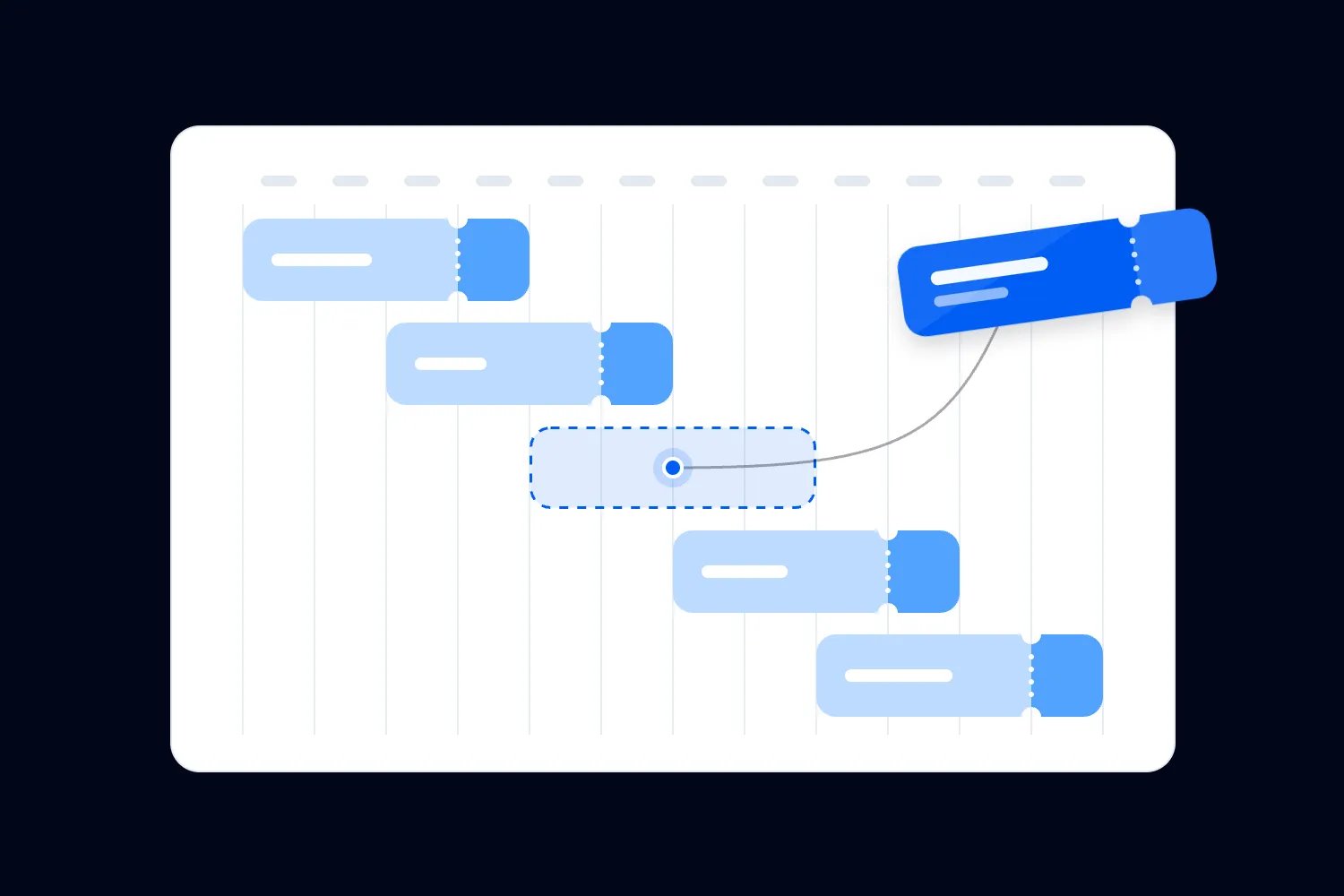
The twelve-week calendar above shows one way to spread the work across six events. In week 4, Event A gets a further promotional push, Event C goes on sale and Event D is announced. Those messages could still reach the same people. The chart shows when work happens; your audience choices determine who receives it. Treat the spacing as an example, not a rule that every event needs the same lead time.
Step 2: Plan emails around the person receiving them
Start with what people are likely to enjoy. SFJAZZ's 2026-27 Take 5 packages group concerts around interests such as Latin jazz, the American songbook and fusion. Buyers choose concerts within a package. The useful idea for your emails is to put related events together so someone can quickly find the shows that appeal to them.
For a venue with several kinds of events, that might mean a comedy selection for past comedy buyers and family shows for people who asked to hear about them. Then check the total number of messages each person could receive:
Choose groups using information you have, such as past purchases and stated interests. Use location or booking-time data only where it is available and reliable. Keep marketing permission and unsubscribe status with each contact when combining lists.
Count all promotional emails together. The weekly roundup, individual event campaigns and automated offers all reach the same inbox. For the worked example below, we'll use a limit of two marketing emails per person per week. Your own limit should reflect what subscribers expect and how they respond.
Decide what matters for each recipient. Someone who already bought Friday's ticket doesn't need Friday's last-ticket sales pitch. They may be a better audience for next month's show.
Use a roundup for people who want to hear about several events. Keep it relevant and make the dates, prices and booking links easy to scan. A long list of unrelated shows creates more work for the reader.
Keep necessary ticket-holder information, such as entry times or a venue change, separate from promotions. Don't withhold it because someone reached your marketing limit, or use it to hide another sales pitch.
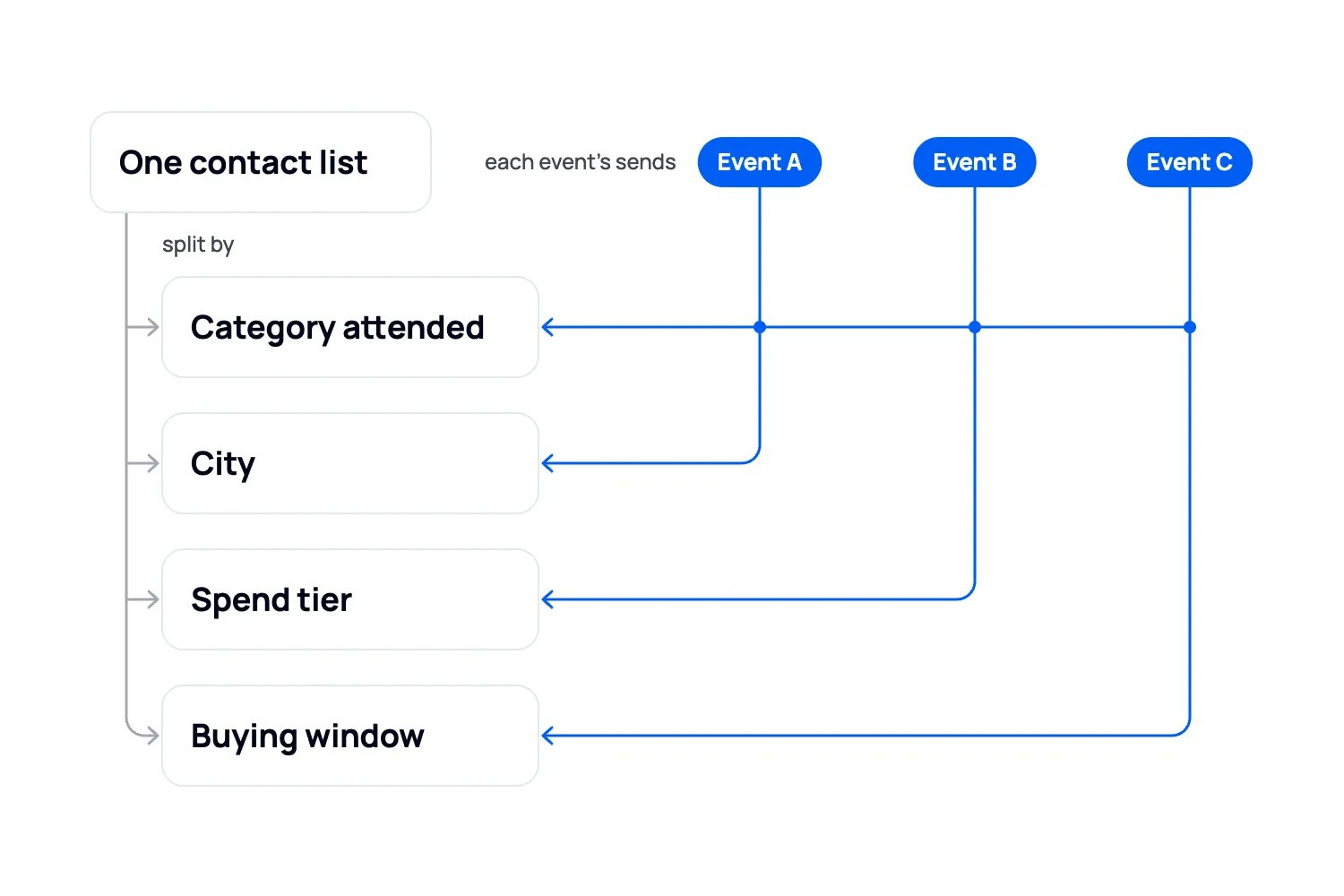
The Loopyah CRM keeps buyers from your events in one contact list, with their event history, spend and marketing permission. You can save groups using those details, and membership updates as people buy. If you're importing contacts from another system, keep their opt-in and unsubscribe status intact.
Loopyah's attendee email tools let you schedule campaigns and set up follow-ups after a purchase, checkout start or attendance. A checkout reminder should stop once the person buys. You still need to coordinate planned campaigns with automated promotions so the same person doesn't get both unnecessarily. Campaign reports show ticket sales and revenue associated with people who clicked. Our email strategy guide covers the messages themselves.
Step 3: Give regulars a reason to book more than one event
Some events make more sense as a programme. A customer who likes your venue might happily book several visits now, if you show them what's coming and make it worth their while.
Chichester Festival Theatre is a useful example. It presented its 2026 season together and staggered booking access across supporter groups before general sale. Its Season Saver offer rewards booking the same number of seats for three or more eligible shows in one transaction, with restrictions on performances and price bands. The customer gets a reason to choose several visits at once.
That is why a blanket rule against announcing several events together would be a mistake. Chichester has a programme people can plan around. For your business, a season announcement, a short series or a selection of related shows may work better than treating every date as a separate launch.
Before offering a discount, do the maths. Suppose three shows normally cost $40 each and you offer all three for $108. That's an illustrative $12 reduction per package. It helps only if the extra bookings justify that reduction and any extra costs. If those buyers would have booked all three at full price, you've given away revenue.
You can also give regulars early notice or first access without reducing the price. Tell opted-in past buyers about a relevant next event, explain why they might enjoy it and link straight to the tickets. A genuine booking deadline or limited allocation can help people decide. Don't invent scarcity to hurry them along.
On Loopyah, you can schedule that email, give a promo code total and per-person redemption limits, and set ticket releases that open after the previous release sells out. A multi-event pass or combined checkout depends on what your ticketing setup supports. Individual event links and a clear recommendation are still useful.
Our guide to building a loyal event community covers how to keep those relationships going.
Step 4: Put ad money where it can earn its way back
Dividing the budget equally between events is simple. It can also leave you advertising a show that's nearly sold out while another has room to grow. Start with available tickets, the money each extra sale leaves you and evidence that the ads are working.
Here is an illustrative comparison. An $80 workshop ticket has $15 in fees and extra attendee costs. If advertising costs $20 per ticket sold, $45 remains toward the workshop's other bills and profit. A $30 club ticket with $10 in fees and extra attendee costs and $12 in advertising leaves $8. The club's ads have the cheaper sale, but the workshop leaves more money per sale.
That doesn't automatically make the workshop the better place for the next dollar. It might have only a few seats left, or its ads might stop performing as you increase spending. The comparison tells you what to investigate before moving money:
Check how many tickets remain and when they need to sell. Stop purchase ads for a sold-out ticket type unless they lead to an available alternative or a clearly labelled waiting list.
Compare the cost of sales with what the event can afford. Use a consistent reporting period and allow for the delay between someone seeing an ad and buying.
Investigate a struggling show before increasing its budget. If people click but don't buy, check the ticket page, price and offer. More traffic won't fix an unclear offer or broken checkout.
Combine related audiences where it makes sense, but keep each event's results visible. Someone who visited a family show's page isn't automatically a useful audience for a late-night club event.
Tracking ads alongside ticket sales helps you make those calls. An ad report can show which sales were linked to a campaign, but it won't explain every reason someone bought. Our ad platform comparison can help you choose where to test.
For an event you decide to promote, the Loopyah AI ads agent can build and manage campaigns across your connected Meta, Google and TikTok accounts. You supply the budget, end date and creative; it adjusts spending across the connected platforms and records its changes. You still decide how much each event should receive. It doesn't make the quarterly budget decision for you.
Step 5: Make each post worth someone's attention
Your social feed needs more than a different event poster every day. Decide what you can produce consistently, then give each post a job. A monthly programme helps people choose dates. A good performance clip gives them a reason to care about a particular show.
For example, a venue could publish its monthly comedy lineup in one post, share a strong clip from the next headliner and answer a practical question about the show. That gives the audience new information each time. Posting the same artwork with a shorter countdown doesn't.
Plan individual posts around useful developments: tickets opening, a performer announcement, a new clip or a real offer deadline. Keep room for a show that needs help, but find something worth saying before adding another post. If the venue or format is new, show people what to expect.
In Loopyah's February 2026 Worth It Event Index survey of 500 US consumers, 41% selected videos of previous events as something they look for when judging whether an event will deliver. Ask for the right footage before the show, while you can still brief whoever is filming. Our event content marketing guide covers planning and producing those assets.
Step 6: Review the events together each week
A weekly review gives you time to change the plan before the work piles up. Look at the same information for each event, then leave with decisions, owners and dates:
Compare sales with a similar event at the same point before the date. Selling half the tickets four weeks out could be encouraging for one show and worrying for another. For a new format, use your forecast and acknowledge that you have less history.
Check what is bringing in sales, what it costs and how many tickets remain. Being closest to the event date doesn't automatically make a show the best use of the remaining ad budget.
Look at the upcoming messages together, including automations. Check overlapping recipients and remove sales pitches to people who already bought the ticket you're promoting.
Check that the next week's work can actually be finished. Confirm artwork, approvals, ticket links and who will handle replies. Move a flexible campaign if that solves the problem; don't promise a launch the team can't deliver.
Be careful with a last-minute discount. A private code still reduces what you earn and may disappoint someone who paid more. Before using one, work out how many extra sales you need and whether price is actually the problem. Use your event KPIs to decide what needs changing, rather than reaching for an offer every time sales slow.
What a busy week looks like
Let's use week 7 from the calendar as a hypothetical example. Event A is Friday's comedy night, Event D is a family show being promoted further ahead, and Event F is a new jazz night going on sale. For this example, the team has chosen a limit of two marketing emails per person per week.
Alex follows comedy and jazz and already has a ticket for Friday. Left unchecked, Alex would get Tuesday's roundup, an automated offer on Wednesday, the comedy sales reminder on Thursday and the jazz launch on Friday. That's four promotional emails. Here's how the team fixes the week:
Monday: review sales and planned emails. Check whether any extra ad spending is justified by recent results and remaining tickets. Identify recipients who qualify for several promotions, including Alex.
Tuesday: send roundups to subscribers who requested them. Alex's version previews the jazz ticket release. The family show features in the roundup for people interested in family events.
Wednesday: postpone the automated promotional offer for Alex. It counts toward the same limit as the scheduled campaigns.
Thursday: send the comedy sales reminder to suitable contacts who haven't bought and have room within the chosen limit. Alex gets no sales pitch, but still receives necessary entry information for Friday's ticket.
Friday: send the jazz launch to interested subscribers with room for another promotional message. Alex gets it as the second marketing email of the week. Recipients who already received two wait for the next suitable send.
All three events can keep their sales plans. The changes happen in the audience choices and send schedule. Alex receives two useful promotions and the information needed to attend Friday's show.
Start with next week's campaigns
Keep each event's timeline, then review the whole quarter together. Check which people your campaigns reach, count automated promotions alongside scheduled ones, and give regulars a useful way to discover their next event. Before increasing ad spending, check what it costs to sell a ticket and how much money that ticket leaves you. Change the plan when the results call for it.
The next step is simple. Put next week's emails and campaigns side by side, including the automated ones, and look for people who would receive several. Fix that week first. For the wider job of filling your programme, start with how to sell more tickets for an event.

Author: By the Loopyah Content Team
The Loopyah Content Team shares expert insights, practical guides, and industry updates to help event organizers create unforgettable experiences and stay ahead in the event planning world.