· 15 min read
Can You Run Ads and Track Ticket Sales Directly From a Ticketing Platform?
Short answer: YES, but "from the platform" can mean three different things, and most platforms do one of them. In this post, we'll unpack all three so you can determine which approach works best for you.
The first is sponsored placement inside the platform's own marketplace, the way Eventbrite Ads or Ticketmaster Promoted put your event in front of people already browsing events.
The second is running Meta, Google, TikTok (and other ad platforms) campaigns from the ticketing dashboard, on ad accounts you own.
The third, which emerged in the last few months: your event ticketing platform running campaigns on the big ad platforms (Meta, Google, TikTok), with AI optimizing them against actual ticket sales and reporting back in plain language.
Three different approaches, each with their pros and cons, but underneath all three, the mechanism is conceptually the same: a medium where your event ad is served, a platform that lets you control your ad spend and make optimizations, and a pixel and/or a server-side connection that feeds back the analytics and conversion events to tell the ad platforms how to get more sales.
We know organizers want this. In our February 2026 survey of 350 event organizers, 36.6% already run paid social ads and 32.9% use their ticketing platform's built-in promotion. At the same time, 28% said reaching new audiences is their single biggest challenge, 22.3% said converting interest into ticket purchases, and a third said more AI-powered tools is the feature their platform is missing most. So let's go through the three approaches, then the tracking underneath them, then where all of this is heading.
Can I run sponsored campaigns directly from a ticketing platform?
Yes. But which of the three approaches you pick decides what you can measure. Marketplace ads reach the platform's own users and report the platform's own numbers. Campaigns you run from the dashboard on your own ad accounts can reach anyone, but they depend on what tracking the platform allows. The third combines three things: the big ad platforms for reach, the event ticketing platform for the sales data, and AI to do the optimizing. It's the only version where the system managing the ads can also see the ticket sales. Let's take them one by one.
1. Marketplace ads inside the ticketing platform's own audience
Eventbrite Ads gives your event a sponsored spot in Eventbrite's search results, category pages, homepage and app. You set a daily budget and a duration, billing kicks in at a $50 threshold, and Eventbrite's own case studies report results like Nasstive's New Year's bar crawls at a 558% return on ad spend with a $0.50 cost per click.
Ticketmaster Promoted does the same thing on Ticketmaster.com. It's cost per click, there's no minimum budget, it's self-serve for US clients, and Feld Entertainment reported an average 11.1x return across 66 campaigns and more than 26,000 tickets.
Bandsintown Boost is a flat fee per show based on venue capacity, from $50 for rooms under 500 to $500 above 5,000. It reports views, ticket clicks and RSVPs, not ticket sales.
A few things to keep in mind with all of these:
The audience is only that platform's users, so treat it as a top-up, not your main channel.
Every number above was measured and published by the platform selling you the ads.
You're competing with other events and have little control over placements and creative.
2. Social campaigns from the dashboard, on your own ad account
Eventbrite's Paid Social Ads lets you build Facebook and Instagram campaigns inside Eventbrite, but the campaigns run on your own Meta ad account. You connect your Facebook account, add a payment method there, and Eventbrite installs your pixel on the event page. It's a convenience layer on top of Meta Ads Manager, and it's useful if you don't have anyone to build campaigns for you.
Does it do much you can't do yourself on the Ad platforms? In fact, the opposite. You could do a lot more by managing Ads from within, say, Google or Meta ad accounts.
We checked the major ticketing platforms and none of them (at time of this post publish) runs Google or TikTok campaigns from inside the dashboard this way. If you want those channels, you're back in the native ad managers, with your ticketing platform's pixel doing the reporting (more on that below).
3. Closed-loop Event Ticketing Ads
What's that? In a nutshell, it's Event ticketing platform x large established Ad platforms x AI optimization layer.
The big ad platforms, Meta, Google and TikTok, because that's where the reach is. The event ticketing platform, because it's the only system that knows which tickets actually sold, how many are left, and when the event is. And AI optimization sitting in-between both, reading ad performance from the platforms and sales from the ticketing side, then making the decisions.
It has nothing to do with marketplace placement: the ads run on the ad platforms you prefer, not inside the ticketing platform's own marketplace pages.
This new category exists today because of a limit the first two share: the system placing the ads can't see the ticket sales, so it optimizes for clicks or platform-estimated conversions instead.
Element one on its own is already strong. The ad platforms have been automating their side for years, and each one publishes its own numbers:
Google, Performance Max: 27% more conversions or value at a similar cost.
Google, AI Max for Search: 14% more conversions or conversion value at a similar cost.
Meta, Advantage+ shopping: $4.52 back per dollar spent, 22% higher than campaigns without it.
TikTok, Smart+ catalog ads: 29% better cost per acquisition than manual setups.
Mark Zuckerberg described where this is going on Meta's Q2 2024 earnings call: advertisers tell Meta a business objective and a budget, and Meta does the rest.
All vendor-reported numbers, and they all share the same limit. Each platform optimizes for its own measured conversions, inside its own walls. None of them can see your ticket sales across all three platforms, how many tickets you have left, or when your event is. That's element two, and only the ticketing platform has it. Element three is what joins them.
That's the combination we built the Loopyah AI ads agent on. You give it a budget, an end date (3 to 30 days), and your own media (images and videos). It builds the campaigns on Meta, Google and TikTok (whichever accounts you connect) and then does the daily work a performance marketing agency would:
Moves budget to the ads that are producing ticket sales, not platform-estimated conversions.
Shifts spend between Meta, Google and TikTok, so the platform selling tickets this week gets more of the money.
Sets the targeting and bidding when it builds the campaigns, then adjusts them as results come in.
Adds negative keywords for search terms that spend without converting.
Pauses underperforming ads and ad sets before they burn through the budget.
Tests new audiences and placements, keeps the ones that sell, drops the ones that don't.
Learns which creative is selling tickets and concentrates spend on it, pausing the ones that aren't.
Logs every change with the reason behind it, daily, and traces every ticket back to the ad that sold it.
Every change is logged with the reason behind it, and every ticket is traced back to the ad that sold it, because the checkout and the ad accounts live in the same place. You pay the ad platforms directly. Under the hood, the agent runs on a range of frontier models, including Claude.
And if you have the event but not the ad budget, Kite takes it one step further. Loopyah puts its own money into Meta, Google and TikTok ads for your event, grows the budget as tickets sell, and takes back its spend plus a 5% fee only from the sales those ads made. If the ads don't sell, Loopyah takes the loss, not you.
See how the AI ads agent worksWhich platforms support retargeting and pixel tracking for event sales?
Retargeting is only as good as the pixel behind it, and the pixel is only as good as the checkout page it fires on. Here's what each platform documents in its own help centre, as of October 2026:
Eventbrite supports a Meta pixel with a Conversions API token, Google Analytics, Google Ads, X and TikTok pixels, firing PageView and Purchase. Two warnings are right there in its own documentation: pixels are disabled with embedded checkout in regions like Europe and the UK, and you can't verify your domain for an Eventbrite event page because the domain is Eventbrite's. Attribution reporting is handled by your pixel provider, not by Eventbrite.
Ticketmaster lets clients place their own pixels on event pages through its TM1 client tool.
Tixr supports Google Ads, Meta and TikTok pixels and native server-side Meta Conversions API tracking. Google and TikTok server-side only work through a customer data platform.
Humanitix supports a Meta pixel but not the Conversions API, and recommends a third-party service for server-side data. GA4, TikTok and LinkedIn go through Google Tag Manager.
Ticket Tailor needs a custom domain before a Meta pixel will work at all, then supports the Conversions API through a token, plus GA4.
Posh and Universe document Meta pixel plus Conversions API, TikTok, GA4 and Google Ads. Luma documents a Meta pixel on its paid plan with no mention of the Conversions API. See Tickets US installs pixels through a Tag Manager container you send to your account manager, and that container doesn't fire on the checkout page.
What this all means: if the pixel can't fire on the checkout page, you can't build a retargeting audience nor optimize your event sales. If you can't verify the domain, Meta limits what you can do with events from it. And without a server-side connection, a growing share of your purchases never gets reported at all.
How attribution actually works, and where it might break
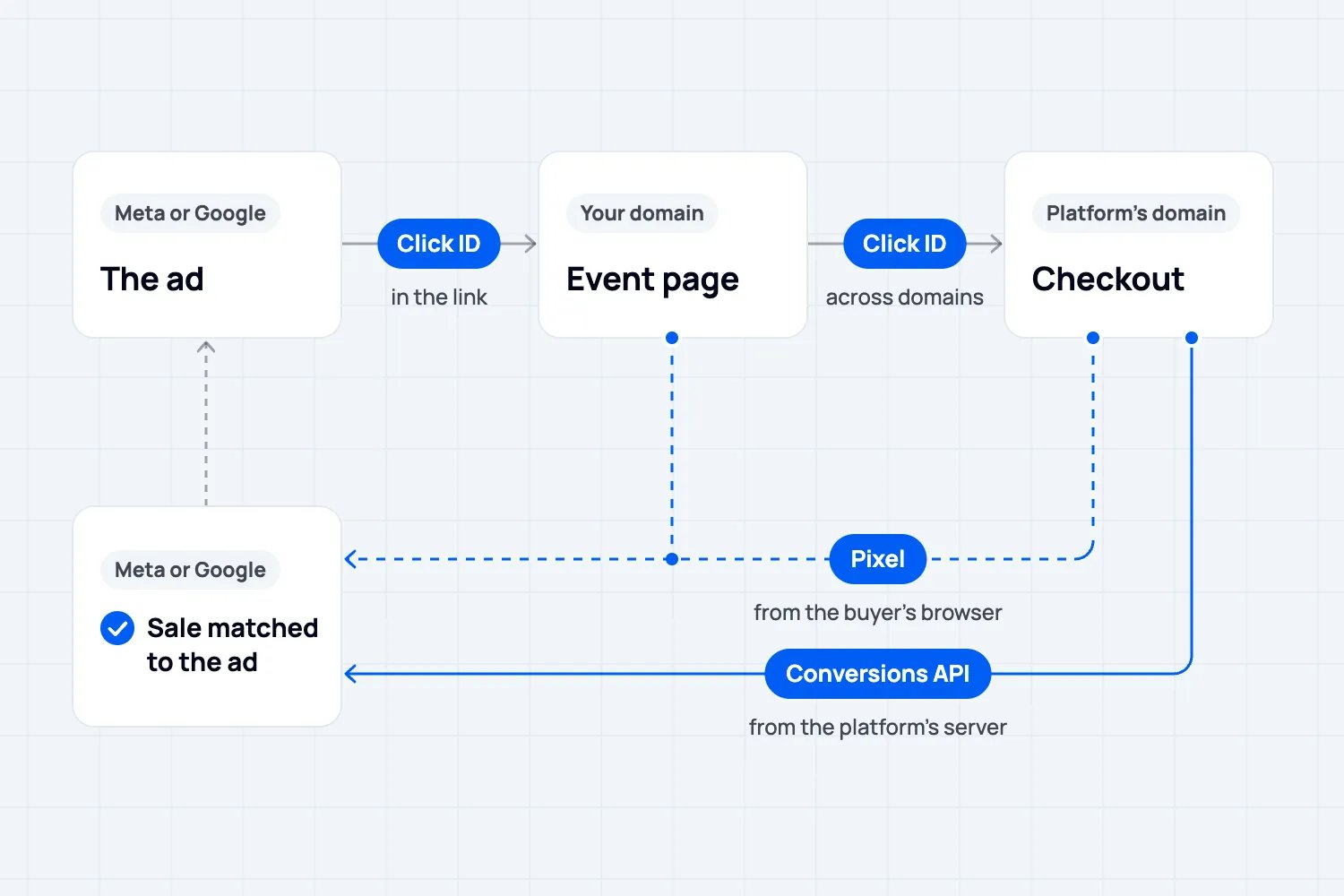
Every ad platform needs the same two things to credit a conversion (in your case a ticket sale) to an ad: a signal that a purchase happened, and a way to match the buyer to the person who saw or clicked the ad.
Here's how each one does it.
Meta Ads
Meta ads run the pixel and the Conversions API together, send the same events through both, and deduplicate them with a shared event ID within 48 hours. Each event gets an Event Match Quality score out of 10 based on the customer data you send with it (hashed email, phone, and so on), and only matched events count for attribution and delivery optimization. Meta reports that advertisers with the Conversions API set up saw a 17.8% lower cost per result than those without it.
Google Ads
Google Ads stores the click ID in a cookie on the domain the ad lands on. On a ticketing platform, the event page and the checkout live on the same domain, so there's no handoff to lose it on. What matters is whether the platform fires Google's conversion tag, with the order value, on the confirmation page, and whether it supports enhanced conversions, which send hashed buyer details with the purchase. Google reported in September 2026 that advertisers using enhanced conversions see on average 11% more Search conversions than standard imports. The cross-domain linker only comes into play if you send ad traffic to your own website first and then hand off to the platform's checkout, or embed the checkout on your site. GA4 purchase events need a transaction ID, value and currency, or they're useless to you.
TikTok Ads
Same idea. Pixel plus Events API, both recommended, deduplicated by event ID within 48 hours.
Browsers and phones: Safari blocks third-party cookies by default and caps script-written storage at seven days, and iOS apps have to ask permission before tracking under App Tracking Transparency. Browser-only tracking undercounts, which is why the server-side connection isn't optional anymore.
This speaks to the common question we get from event organizers: which vendors provide fan-level attribution linking social ad impressions to ticket purchases? The answer: A system that sends the purchase, with hashed buyer identifiers, server-side to the ad platform at the moment of sale. Or an event ticketing system that has access to your ad platform metrics and your event sales metrics. Ideally, you want both. If your ticketing platform doesn't do that, no dashboard can magically give you what you need.
Questions to ask your ticketing platform before you spend on ads
Does your pixel fire on the checkout page?
Do you send purchases with value through the Conversions API, enhanced conversions and the TikTok Events API?
Can I verify my own domain?
Do I own the ad accounts and the audiences?
Can I export orders with the source and campaign that sold each ticket?
What platform should I use to sell tickets through ads?
It depends on which of the three approaches you need.
If you want reach inside a marketplace and you don't have a media buyer, the marketplace products are cheap to test. Set a small budget, watch cost per ticket (not impressions), and remember the audience is capped at that platform's users.
If you want to own the audience, which is the only way to bring your cost per ticket down over time, you need a platform that passes the five questions above and lets you run Meta, Google and TikTok on your own accounts. Where to spend follows the buyer. In our study of 500 US event attendees, 65% rely on social media posts or ads to find out about events, and the platforms that most influence the decision to attend are Facebook (52.8%), Google Search (40.6%), YouTube (39.2%), Instagram (37.6%) and TikTok (30.6%). Our comparison of ad platforms for ticket sales goes through each one, and our event advertising guide covers creative and offers.
If you have the budget but not the hours, you want the third category: your ticketing platform running the big ad platforms, with AI optimizing against ticket sales. The tracking questions still apply to it, so ask how it measures a ticket sale.
And the rest of the lifecycle: Claude and ChatGPT connected to your ticketing
Ads are one stage. The same organizers asking us about running sponsored campaigns from a ticketing platform are also asking whether they can create the event, pull the sales numbers, segment the audience and email it without opening a dashboard. Since 2025 the answer is yes, through the Model Context Protocol.
MCP is an open standard, released by Anthropic in November 2024 and now run by the Linux Foundation's Agentic AI Foundation, that lets AI apps connect to external systems. Their own docs call it a USB-C port for AI. Claude and ChatGPT both support it, Claude's connector directory passed 200 connectors in April 2026, and there are more than 10,000 public MCP servers out there.
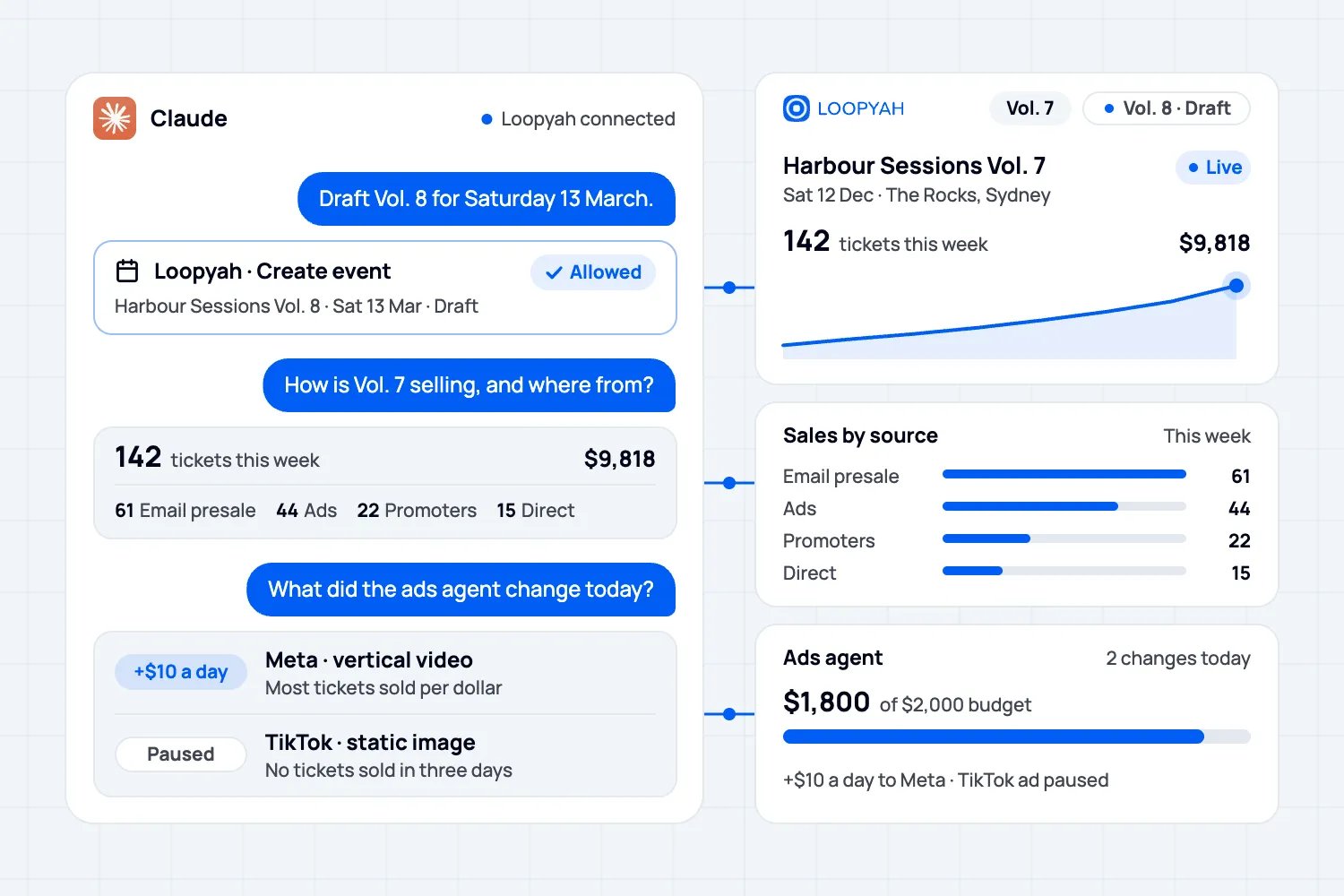
Loopyah has one. You paste one address, api.loopyah.com/mcp, under Connectors in Claude or under Apps and Connectors in ChatGPT's developer mode, sign in to Loopyah the way you always do, choose Read only or Read and edit, and it stays connected for 90 days of use. From then on, in the words of the Loopyah and Claude page, you manage events, tickets, contacts, sponsors, ads and money in the same words you'd use with your team:
"How is Vol. 7 selling this week?" gets you tickets sold, revenue and sales by source.
"Open another 100 General release tickets at $59" changes capacity and price, after asking you to confirm.
"Make a 20% code for the street team, 50 uses" creates the promo code.
Build a contact list from past buyers, schedule an email campaign to it, approve a sponsor application, or check how the ads agent is spending.
The connector asks before every change, and money never moves through it: refunds, payouts, purchases and payment setup only exist inside Loopyah, so there's nothing for an assistant to call. It's free with Loopyah on every plan, and your Claude or ChatGPT plan covers the AI.
Put it all together and the whole lifecycle becomes complete.
Describe the event and the connector creates it.
Publish, and the ticket checkout sells.
Give the ads agent a budget and two creatives, and it runs Meta, Google and TikTok against actual ticket sales.
Ask Claude how it's selling,
Segment the buyers in the CRM for the next one.
Your job becomes the decisions: which event, what price, which creative?
The dashboard work goes to the agents.
The short answer, again
Can you run ads and track ticket sales directly from a ticketing platform? Marketplace ads: yes, with reach limited to that platform's users. Your own social campaigns from the dashboard: on a few platforms, on your own account. Full attribution: only where the pixel fires on checkout and purchases go server-side with buyer identifiers, and that's the question to ask before you spend a dollar. And the third category, which is what Loopyah does: the ticketing platform runs the campaigns on Meta, Google and TikTok, with AI optimizing against real ticket sales, plus a Claude or ChatGPT connection for everything around it.
Pick the platform that answers the five questions, set up the tracking before the first campaign, and measure in cost per ticket sold. If you're weighing Loopyah against the platform you use today, the Eventbrite comparison is the place to start.

Author: By the Loopyah Content Team
The Loopyah Content Team shares expert insights, practical guides, and industry updates to help event organizers create unforgettable experiences and stay ahead in the event planning world.