· 14 min read
Google Ads for event ticket sales: a practical setup guide

So you've got an event to fill, and you're thinking about Google Ads. Before you start spending, you need to know whether Google will approve your ads, how you'll track ticket purchases, and what you can afford to pay for each sale.
This guide covers eligibility, purchase tracking, an affordable budget, your first Search campaign and the decisions to make once it runs. If you're still choosing channels, start with our comparison of ad platforms for ticket sales.
Check Google's event ticket eligibility before launch
Google's event ticket sale policy requires eligibility confirmation for the ticket sales it covers. Its examples include spectator sports, theater, concerts and live virtual events. These examples are not exhaustive.
Your role matters:
A primary provider initially sells the tickets, such as the organizer, venue or an authorized ticket seller.
An event-associated group is the artist, team, venue or similar organization on whose behalf tickets are sold.
A reseller sells tickets already sold or allocated in the primary market. Resale and mixed inventory bring additional requirements.
An organizer linking to a primary ticketing provider is not automatically a reseller. Equally, using a ticketing provider does not make your own ad account approved. Google ties eligibility to the individual advertising account and advertised domain.
Use the application linked from the policy, select the role that describes your actual sales arrangement, and confirm the account and destination you plan to advertise. Check resale-specific disclosures and ad restrictions if you sell or link to resale inventory.
What about a paid conference or workshop? Don't infer a blanket exemption from its absence in the examples. If your event's classification is unclear, ask Google to confirm it before committing your launch to paid traffic.
Keep the application response with your campaign records. It is much easier to resolve a question when you can show the account, domain and approval you are working with. Leave time for review before your ticket release, rather than discovering a restriction on launch morning.
If Google disapproves the ad
Open the ad's policy details and read the actual reason. If ticket-sale eligibility is missing, complete that application for the account and domain you are using. If the problem is the ad or event page, correct it before requesting another review.
Google's disapproval and appeal guidance explains how to request review after a fix or dispute a mistaken decision. An appeal does not replace an eligibility application.
Track a completed purchase through the actual checkout
The first thing you want to do is follow the same route as a buyer. Open the event page on your phone, choose tickets, pay and reach the confirmation. If your website hands the buyer to another domain, that handoff is part of the setup you need to verify.
Loopyah's AI Ads Manager sets up campaign tracking for events sold on Loopyah. The checks below help you verify what is being measured. If you run campaigns directly in Google Ads, use them with whoever manages your ticketing connection before launch.
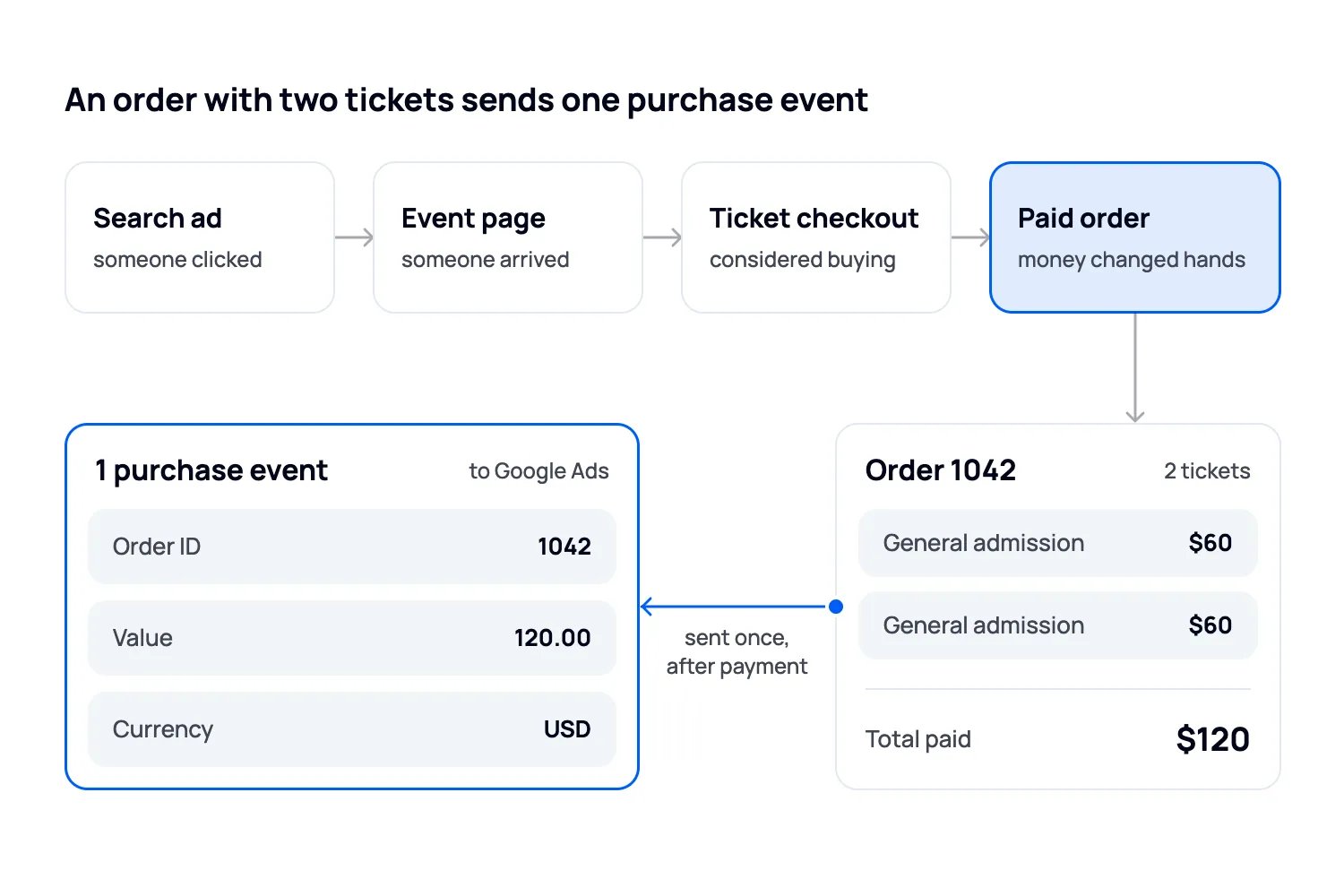
An event-page visit tells you someone arrived. A checkout start tells you they considered buying. Neither tells you that money changed hands.
If you manage campaigns directly in Google Ads, make a completed purchase the main conversion used for the ticket-sales campaign. Google's primary and secondary conversion guidance explains which actions can guide bidding. Keep page views and checkout starts available for diagnosis, without letting them inflate your sales result. Check custom goals too, because they can use an action for bidding even when it is marked secondary.
Confirm what the ticketing platform sends
Ask whoever owns the checkout to demonstrate the purchase event. You need the order reference, the amount and currency, and a clear definition of what the amount includes.
Google supports different values for each conversion. That matters when a buyer chooses a different ticket tier, applies a discount or buys several tickets. A default value assigned to every order can make the campaign look more or less valuable than it is.
Use a unique order reference to prevent the same purchase being counted twice when a confirmation page reloads. Google's transaction ID guidance distinguishes this from choosing whether to count one or every conversion after an ad interaction. You generally want every separate purchase, with each purchase counted once.
Also check whether the same purchase enters Google Ads through both a direct connection and an Analytics import. An order reference does not make two separate conversion actions one sale. Choose which purchase action guides the campaign.
Test the whole journey
Make a test purchase through the route your ads will use. Check that the purchase signal is sent after payment, with the right amount and currency. Reopen the confirmation and check that it doesn't create a second sale. Ask your provider how refunds, discounts and orders containing several tickets appear in the reports.
Your ticketing report answers "Did they pay?" Google's report answers "Which ad gets credit?" Check both. A payment can succeed even when the advertising connection loses track of the buyer. Ask your provider to test the route between your website and checkout, including how tracking responds to the buyer's consent choices.
Our guide to running ads and tracking ticket sales through your ticketing platform goes further into those connections. Fix a missing purchase signal before using purchase-based bidding. Calling a button click a sale will not fix it.
Work out what you can afford to pay for a sale
There is no useful universal answer to "How much should I spend on Google Ads?" A campaign that works for a high-priced workshop can lose money for a show with expensive per-person hospitality.
Start with what you expect to keep from each ticket. Account for discounts, taxes you remit, fees you absorb and expected refunds. Then subtract the additional cost of serving that attendee. The amount left still has to help pay fixed event costs and the profit you want to keep.
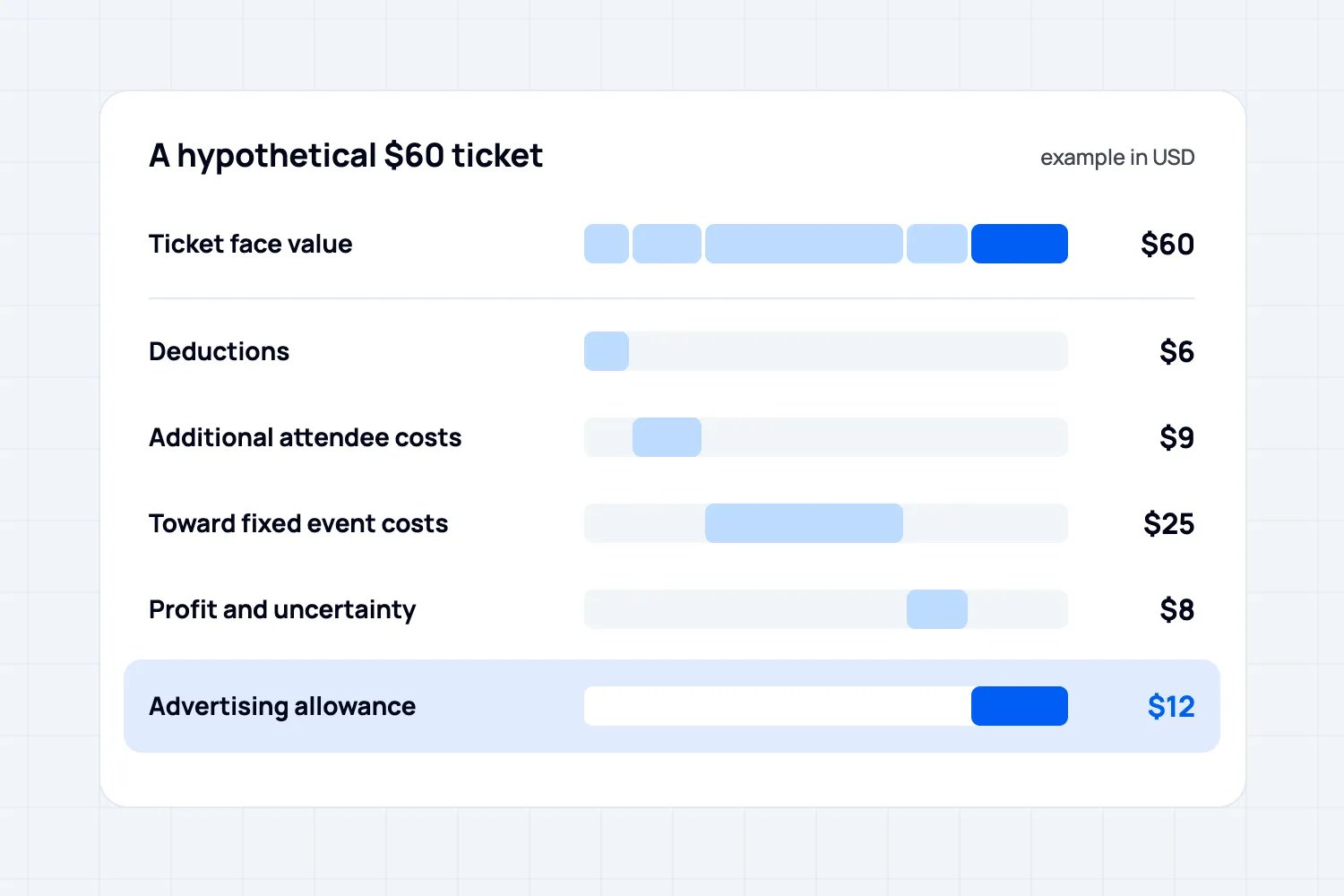
Here is a hypothetical example in USD. It is a planning calculation, not a benchmark or a Loopyah result.
Ticket face value is $60.
After the applicable deductions, you expect to keep $54 per ticket before event delivery costs and advertising.
Serving one more attendee costs $9, leaving $45.
Your event budget requires $25 of that amount toward fixed costs, based on a realistic paid-attendance forecast.
You reserve another $8 for profit and uncertainty.
That leaves $12 per ticket for advertising.
For this event, $12 is the planned advertising ceiling per additional ticket. If you want ads to produce 100 additional tickets, the corresponding media allowance is $1,200. That allowance depends on achieving those sales. It is not permission to spend the entire amount regardless of results.
Check the fixed-cost allocation against the whole event budget. If expected attendance falls, $25 per ticket may no longer cover those costs. If a discount leaves you less from each ticket, recalculate before advertising it. Subtract any extra campaign production or management costs from the allowance as well.
Keep orders, tickets and profit separate
Imagine that $600 in advertising is attributed to 25 orders containing 50 tickets in this same example. Your cost is $24 per order and $12 per ticket. Comparing the $24 order cost with a $12 ticket allowance would give you the wrong conclusion.
At $60 face value, those tickets represent $3,000 in ticket revenue. Divide that by $600 and you get 5x return on ad spend, or ROAS. You still have deductions, delivery costs and fixed costs to pay. ROAS is a revenue ratio, not the event's profit.
There is another question: how many buyers would have bought anyway? An attributed sale is not proof of an additional sale caused by the ad. This is especially relevant when someone searches your exact event name after seeing your email. Keep those searches visible separately when judging whether more spend is worthwhile.
Give your first Search campaign a clear job
Start with a specific buying situation. "Comedy tickets in Austin this Saturday" is easier to connect to an event than "things to do." The wider phrase can be useful, but it also asks you to pay for people still deciding what kind of outing they want.
If you're building the campaign yourself, the choices below are yours to set. If Loopyah manages it, use them to explain who should buy and to understand the changes the agent makes.
Choose keywords that match what you sell
For a hypothetical Austin comedy show, start with searches about the show itself and searches such as "comedy tickets Austin." Keep the event-name searches distinguishable in your reporting. Someone who already wants your show is a different prospect from someone choosing a night out.
Google's keyword matching guidance explains the difference. Exact match, written as [comedy tickets Austin], can match searches with the same meaning or intent, such as "Austin comedy tickets." It doesn't require identical words. Phrase match, written as "comedy tickets Austin", can reach searches that include that meaning, such as "comedy tickets Austin this Saturday." These are examples; your search terms report will show what actually triggered the ads.
Broad match reaches related searches more widely. Google recommends pairing it with Smart Bidding, its conversion-based automated bidding.
For a small first test, we'd start with a narrow set of buying intentions you can explain. Widen it when the purchase data supports doing so.
Write an ad someone can make plans from
Write the ad around what the buyer needs to decide: the event, city, date, relevant performer or experience, and the ticket offer. Send them directly to the corresponding event page. A buyer looking for Saturday's show should not have to search your calendar again.
For that hypothetical comedy show, you might supply these headline options. Each must fit Google's 30-character limit:
Austin Comedy This Saturday
Live Stand-Up at 8 PM
Book Saturday Show Tickets
And these description options, each within the 90-character limit:
Make Saturday a comedy night. See the lineup, venue details and tickets for the 8 PM show.
Book tickets for live stand-up in Austin. Check the full price and entry details online.
Use these as starting points and replace the details with your actual show. Give each line a useful job. A buyer needs to know what is happening and whether it fits their evening.
Google's responsive Search ad guidance explains that it tests different headline and description combinations. Each line must make sense by itself and with the others. Don't split a crucial condition across lines that may not appear together. Check the assembled previews, and retire price or deadline copy when the offer changes.
Check the landing page against the ad before launch:
The date and location match.
The advertised ticket or price is actually available.
Any age or admission restrictions are easy to find.
The buyer can understand the total payable and finish on a phone.
Decide whether you need locals or people planning a trip
Choosing the venue's city is only part of location targeting. Google's default location option can include people who have shown interest in the area, as well as people likely to be there. That matters when the event is this Saturday and the person clicking is nowhere nearby.
For a local evening show, consider "Presence" targeting, which focuses on people in or regularly in your selected area. For a destination festival, someone researching a trip from another city may be exactly the buyer you want. Make that a deliberate choice and judge the resulting ticket sales.
Location estimates are not a guarantee that every person can attend. Put the city and date in the ad and check the locations in your reports. Don't copy another organizer's radius without thinking about how far your own audience would travel.
Once ads run, review the actual searches, not only the keyword list you supplied. Google's search terms report shows searches that triggered ads, subject to reporting limits. Use it to exclude irrelevant intent. A paid concert usually does not need to pay for searches about venue jobs or volunteering. Check the context before blocking a word across every campaign.
Set a spending limit and review the right numbers
Give the campaign an end date that matches when tickets stop being useful to the buyer. Check the account's time zone and leave room for any advance-booking cutoff.
If you build the campaign in Google Ads, understand the budget type you choose. Google describes a campaign total budget as a cap across the campaign's duration. For Search, select it when creating a new campaign and set a duration of 3 to 90 days. Existing campaigns cannot switch from average daily budgets to total budgets.
An average daily budget is different: for most campaigns, Google's daily spending limit can be twice that average. Do not mistake the daily setting for a hard daily cap.
Use the smallest test allowance that gives you useful evidence without putting the event budget under pressure. Decide beforehand how much you can spend while sales are uncertain. An affordable cost per ticket is a target, not a promise Google will deliver it.
During the run, read spend alongside completed orders, tickets in those orders, what you keep from those tickets, and how many places you still have to sell. In Loopyah, the event sales dashboard gives you the event's sales report. Keep that actual sales record alongside the advertising report.
When the campaign isn't selling, find where it stops
If the campaign isn't producing ticket sales, don't immediately raise the budget. Work through what you can see:
The ad barely appears. Check its status, dates, budget and targeting. A tiny search audience may not contain enough buyers for your sales target.
The searches are wrong. Read the search terms and exclude the irrelevant intent. More spend will only buy more of the same traffic.
People reach checkout but leave. Check the final price, payment options and the exact route on a phone. Re-read the ad for a promise the page doesn't deliver.
Tickets sell but Google reports none. Inspect the purchase connection before judging the campaign. Check whether recent buyers simply need more time to appear in the reports.
Change the part that explains the problem. Rewriting the ad won't repair a broken payment flow.
Allow for the time between a click and a purchase when judging recent spend. But do not increase the budget merely because clicks are cheap or sales elsewhere in the business are rising. You need evidence that the campaign can sell tickets within the allowance you set.
Let Loopyah handle campaign work while you own the budget
If your tickets sell on Loopyah, you don't need to build the campaign structure and tracking yourself. Our AI Ads Manager connects to your Google ad account, builds campaigns and connects ticket purchases to the advertising activity. You set the total budget and end date, and pay the ad platforms directly.
The agent can adjust keywords and budgets, pause ads and record what it changed and why. Google Search does not require image or video creative; other placements need the media you supply.
You still decide what the event offers, what a new buyer is worth and how much you're prepared to spend. The agent handles campaign work; your event budget tells you whether those sales make sense. Google's approval rules still apply, and ticket revenue still has to cover the event's costs.
Before you switch the ads on
Check that Google can run your ads, make a test purchase and calculate what you can pay to sell another ticket. Then launch with a spending limit and an end date. If the sales cost more than your event can afford, find the cause before buying more traffic.

Author: By the Loopyah Content Team
The Loopyah Content Team shares expert insights, practical guides, and industry updates to help event organizers create unforgettable experiences and stay ahead in the event planning world.