· 12 min read
Best retargeting ads for theatre shows that actually convert
The best retargeting ads for a theatre show answer the question that stopped someone buying a seat. Show what the performance feels like, make the date and price clear, and send people straight to the relevant performance. Exclude people who already bought that performance wherever your tracking and campaign controls allow it.
A rehearsal view and an unfinished checkout show different interactions, but neither tells you exactly why someone didn't buy. Use the questions your box office receives to form a useful hypothesis. Repeating the same poster to everyone won't help you learn which question needs answering.
This guide covers five creative approaches, how to choose the audience, what you can afford to spend, and how to judge the results before the curtain comes down. The copy examples are templates, not claims about real productions or guaranteed winners.
Start with the performance you need to sell
You might have a healthy Saturday evening and a half-empty Wednesday matinee. An ad saying "Book now" for the entire run gives buyers no reason to choose the performance that needs them.
Write down the production, performance dates, available seats and the minimum ticket proceeds you need to keep. Include the actual booking cutoff. If online sales close before doors open, that is your advertising deadline.
Then check the journey on your phone. Can a buyer see the available dates, understand the total price and find the seat selection? Does a link to Wednesday actually open Wednesday? A paid reminder cannot repair a confusing booking page. Our landing page guide covers those decisions in more detail.
For a multi-date run, distinguish production-level interest from interest in a particular performance. Someone browsing the production may still be choosing a night. Someone who selected Wednesday has already made part of that decision. Use those differences only where your tracking actually records them.
Keep the offer accurate as inventory changes. If the advertised ticket price disappears when the cheap seats sell, change the ad or stop it. If Saturday sells out, take it out of the creative rather than sending people to a dead end.
Five retargeting ad approaches worth testing
Use the evidence you have to choose the first message. Repeated questions about timing or travel point to a practical-information ad. Uncertainty about the production points to a performance clip or relevant review. A recorded performance selection supports a date-specific reminder.
With little evidence, start by comparing a performance clip with one practical answer from the box office. You don't need five campaigns, and an abandoned checkout is not automatically a request for a discount.
1. A performance clip that explains the experience
Use a short scene, musical passage or rehearsal moment you have permission to promote. Choose something a new viewer can follow without knowing the plot, such as a self-contained joke or an exchange that reveals the show's tone. Check it with someone outside the production before spending money to distribute it.
Put the production name, venue and remaining dates on screen. Add captions so the message works without sound. Do not use a rehearsal clip to imply a costume, set or performer will appear in the final show if that is uncertain.
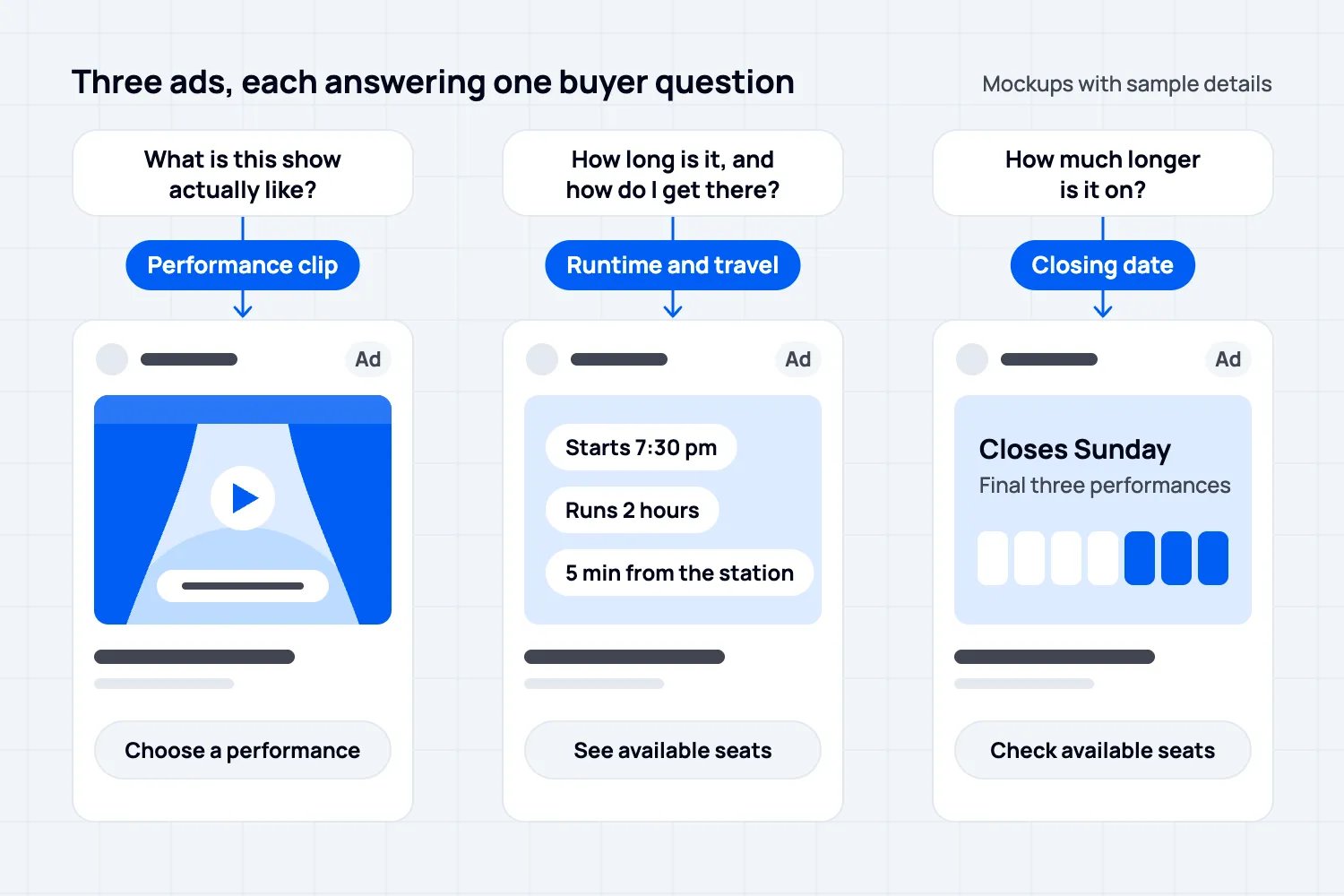
Example copy: "A family dinner. One announcement nobody expected. [Show name] plays [venue] through [closing date]. Choose your performance."
This gives a curious viewer more substance than another logo. Test it with people who previously engaged with the production, using the audience options available in your account.
2. A practical answer to an unanswered question
Sometimes the obstacle is logistics. Is there an interval? What time will the audience leave? Is the venue easy to reach? Does the show suit someone coming alone?
Use a clear image and answer one of the questions your box office actually receives. Put the rest on the booking page. Avoid squeezing the entire FAQ into a carousel.
Example copy: "[Show name] starts at [time] and runs for [duration], including [interval details]. See available seats for [date]."
Check those details with the production team. If runtime is still an estimate, say so. For access information, link people to confirmed arrangements and a contact who can answer individual questions.
3. Evidence that helps someone choose
A permitted review excerpt, a genuine audience reaction or a clear production photograph can help a buyer judge whether the show is for them. Use evidence from this production and identify it accurately.
If you use a critic's words, retain their meaning, attribution and any required permission. Do not borrow praise for an earlier tour and present it as a review of the current cast.
A template can be as simple as "[Approved review excerpt]" followed by the publication name, show dates and booking instruction. Fill that space with real evidence before the ad runs. A quote-shaped design is not a reason to invent a quote.
4. A reminder for the date someone considered
Where your data supports performance-specific audiences, bring people back to that performance with accurate availability. The message should feel like useful information, not a declaration that you watched their browsing.
Example copy: "Wednesday at [venue]. [Show name], [start time]. Tickets available from [current total price]. Choose your seats."
Do not say "Your seats are waiting" unless the seats really are reserved for that person. Browsing a seat map does not normally mean they own a hold. A generic reminder should never imply a personal reservation.
5. A genuine closing-date reminder
A limited run has a real deadline. State it plainly, with the remaining performances and a working booking link.
Example copy: "Final performances of [show name] this [day range]. The run closes [date]. Check available seats."
Only use "last seats" when the relevant inventory supports that statement. A production with several hundred seats across its remaining dates should not manufacture scarcity because an urgency template looks good.
Keep discounts separate from reminders. If you offer a reduction, know which performance needs it, what it costs you and when it ends. A repeated discount can reduce proceeds from people who were already preparing to pay full price.
Match the audience to the question
Retargeting means advertising to people who have already interacted with your business. It does not mean you can identify every visitor or reach everyone who once clicked.
Start with a simple distinction between people who viewed the production and people who began booking without completing a purchase. If both groups are too small to support separate delivery, combine eligible visitors and engagers for the same production instead of creating a collection of empty campaigns.
Google's audience examples describe including people who viewed an item and excluding those who purchased it. For theatre, decide whether the item means the whole production or a specific performance. Excluding every past customer would also remove people who might buy a different show.
Check how long people normally take to book. A visitor from yesterday may still be arranging a night with friends. A visitor from months ago may have been looking at a different cast or tour date. Choose an audience window that reflects that buying cycle and the remaining run.
Size matters too. Google's current segment requirements use active, eligible users, not your website's headline visitor count. As checked in October 2026, its documentation lists a minimum of 100 active users in the preceding 30 days for Search, Display and YouTube, with qualifications for older customer lists. Meeting a minimum does not prove that a separate campaign is commercially worthwhile.
Customer-list advertising has its own conditions. Meta's audience terms require the necessary rights, permissions and lawful basis for using uploaded data. Having a box-office email address does not by itself settle whether you may upload it for advertising.
If you manage campaigns directly, check whether the campaign can expand beyond the audience you selected. A campaign using visitors as a suggestion is different from one limited to those visitors. Keep that distinction in your reporting.
Set the budget from what another ticket contributes
Start with the proceeds you retain, then subtract costs that increase when another person attends. That gives you the amount available to cover advertising, fixed production costs and profit.
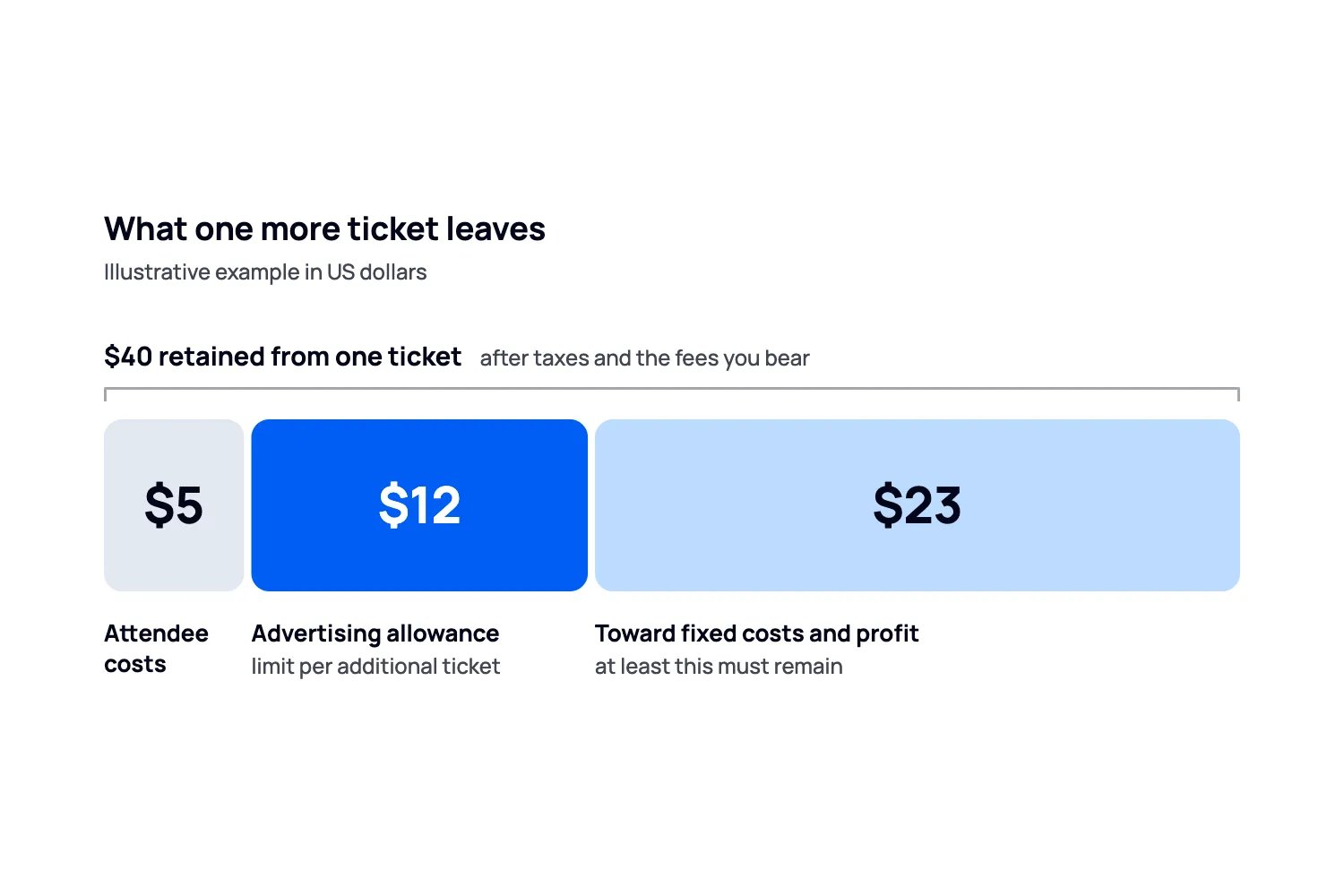
Here is an illustrative example in US dollars, not a theatre benchmark or a Loopyah fee quote:
A ticket produces $40 after applicable taxes and the fees borne by the organizer.
Another attendee adds $5 of delivery costs.
That leaves $35 before advertising and fixed production costs.
You decide that at least $23 must remain for those fixed costs and profit.
Your planning limit is therefore $12 of advertising cost per additional ticket.
Suppose you spend $180 and the campaign is credited with ten orders containing 15 paid tickets. The reported cost is $18 per order and $12 per ticket. Compare the ticket figure with your $12 ticket allowance. Under the example's assumptions, those tickets provide $525 before ads and $345 after that ad spend. This doesn't establish that the whole production is profitable.
It also does not establish that advertising caused all 15 sales. Some buyers may have returned anyway. If only ten sales were additional, the same spend cost $18 per additional ticket. Your assumed $12 limit would no longer be met.
Use this as a spending decision, not a claim of precision. If the production has room for only ten more paid seats, do not allocate a budget that requires selling twenty to make sense. Recalculate when discounts, seat prices or variable costs change. Our event budget guide covers the wider cost plan.
Give each ad a useful moment in the run
Before opening, creative can explain the production and practical arrangements. Once you have genuine reviews or audience feedback, a new ad can answer the confidence question. Near closing, a truthful deadline can help someone stop postponing the decision.
These are editorial starting points, not a mandatory sequence every buyer must see. A short run may have no time to collect meaningful reviews. A revival may already have permission to use evidence that is clearly labelled as coming from an earlier production.
For a modest test, compare the performance clip with the practical-information ad while keeping the performance, audience and offer consistent. If you change the price, date, audience and creative together, you won't know which change deserves another test.
Set a maximum test spend before launch. With the illustrative $12 allowance, a $60 test needs five additional ticket sales to meet the target. Use a smaller ceiling if the available seats or your budget can't support that test. Pause at the ceiling and review completed orders, refunds and the usual delay between an ad interaction and booking before allocating more.
The ceiling limits what you can spend while learning. Five reported sales would still not prove the ads caused five extra sales, or establish a reliable winner between two creatives. If booking normally takes several days but the performance closes tomorrow, don't keep extending a test that cannot inform a useful decision in time.
Review the remaining seats alongside spend. Pause a message when its performance is no longer bookable. Move attention to another date only if that date is a realistic alternative for the audience; do not assume everyone considering a Saturday evening can attend a weekday matinee.
Keep transactional messages separate. Existing buyers need arrival details and updates. They should not need to click another sales ad to learn that the doors open earlier than the ticket says.
Judge sales, not just a flattering ad report
Check completed orders, ticket quantities, refunds and the cost of the creative alongside media spend. An order containing four tickets is not the same as four separate buyers. Make sure the denominator in your cost calculation matches what you are trying to buy.
Google's conversion windows determine how long after an ad interaction a purchase can be recorded. Different windows can produce different reports from the same sales activity. Record the setting before judging two campaigns against each other.
Use checkout records to count distinct completed orders and the paid tickets inside them, allowing for refunds. The same order can receive credit in more than one ad platform, so adding platform totals can count the same sale twice. Match order IDs where the reports provide them; otherwise keep the platform's attributed total separate from confirmed checkout sales. Attribution assigns credit. It doesn't prove that every credited sale depended on the ad.
Loopyah's AI Ads Manager connects to Meta, Google and TikTok, builds campaigns, sets up ticket-sale tracking and adjusts spending against orders recorded in Loopyah. You supply the creative, budget and end date, and can read the changes it makes. That removes campaign administration; the choice of show, offer and useful creative still needs your judgement.
If you use it, you do not need to recreate that setup manually for the same campaign. If you manage advertising yourself, use your platform's current setup instructions and verify that a completed ticket purchase is being recorded. Neither route guarantees every sale is caused by advertising.
Choose the next ad from the unanswered question
For your next theatre campaign, pick the performance with saleable seats, identify the buyer's likely hesitation, and make one ad that answers it. Give the campaign a spending limit based on ticket proceeds and a stop date based on the actual booking deadline.
Then check whether the sales justify continuing. Better retargeting is a clearer reason to book, shown to a relevant audience at a cost the production can carry.

Author: By the Loopyah Content Team
The Loopyah Content Team shares expert insights, practical guides, and industry updates to help event organizers create unforgettable experiences and stay ahead in the event planning world.