· 16 min read
What Should Nonprofits Evaluate When Choosing Event Registration and Payments?

So you're choosing a registration platform for your nonprofit event. The first thing you want to do is follow a booking all the way through: the purchase, the ticket, the donation, the check-in and the money reaching your bank. That tells you whether the platform will actually work for your team.
There are eight things to look at: data exports, donation receipts, payouts and refunds, fees, checkout, security, check-in and follow-up. We'll walk through each one, then put them together in a demo you can run before you commit.
You'll also see the term "data extraction" come up in platform comparisons. It means getting your registration and payment records out so your donor CRM and finance team can use them. Think about someone buying a table for ten. You need to know who paid, who's coming and whether they added a donation. A list of ten names won't tell you all of that.
Our guide to event registration software for nonprofits covers the options if you're still building your shortlist.
1. Start with the data you'll need after the event
Imagine your gala has finished. You want to thank the people who donated, invite guests to the next event and give finance the numbers they need. This is where you find out how useful your registration data really is.
Let's go back to that table booking. One person pays, ten people attend, and the buyer adds a gift. They're connected, but they aren't ten donors. Your platform needs to keep track of those differences so you don't end up with the wrong giving history.
Get a real CSV export from a test event and open it with whoever manages your donor CRM and accounts. Here's what you want to see:
Separate details for the person who paid and the people attending, including ticket type and check-in status.
Reference IDs that connect each contact, order, ticket, payment and refund. Nobody should have to guess whether two people with the same name are the same supporter.
Ticket amounts, donations, discounts, taxes, fees, refunds and currency in their own fields where they apply.
Payment dates and status, plus a payout reference that helps finance match the money to the bank.
The registration answers, campaign details and marketing permission your team needs, including when and how that permission was collected.
A returning supporter should keep their history when they buy again. That can mean one contact with several orders, spread across several files. What matters is that the records connect correctly.
Next, try bringing those records into your actual donor CRM. Does the connection run automatically, need a paid connector or rely on someone importing a file? Change a supporter's email and make another purchase. See what updates, what creates a duplicate and who gets notified if the transfer fails.
In Loopyah's CRM, ticket buyers have their event history, spend and email permission together. You can also download a guest list with names, ticket types and check-in status. You'll still want to test the specific records your donor CRM and accounts need.
Before signing up, find out how to export your full history if you leave, what it costs and when access ends.
2. Make sure the receipt tells the right story
Now think about what the supporter paid for. At a fundraising dinner, part of their payment might cover the meal and part might be a charitable contribution. They might add a separate donation too. Your records need to show those amounts clearly.
This is where your finance team needs to be involved. They should approve the value of any benefits the buyer receives and the wording on the receipt. The platform needs to let you use that wording.
For US organizations eligible to receive deductible contributions, there are two rules worth understanding:
If a payment over $75 is partly a gift and partly payment for goods or services, the organization generally has to give a written disclosure. It must explain that only the amount above the value of those benefits is deductible and give a good-faith estimate of that value. The $75 threshold applies to the whole payment. The IRS guidance on quid pro quo contributions explains this.
To claim a deduction for a single contribution of $250 or more, the donor needs a written acknowledgment received within the IRS's required timeframe. Benefits they receive affect the contribution amount. The IRS substantiation guidance covers the timing and what the acknowledgment must include.
Those are US rules. Your team needs to confirm the requirements wherever your organization operates.
Go through the actual email a supporter receives. Can it show ticket and gift amounts separately, use the approved wording for that ticket type and name the payer even when someone else attends? Then refund a ticket and see what happens to the records and any acknowledgment that needs correcting.
You'll also want individual contribution dates and amounts in the export. An annual total on its own leaves your team without the detail they need. And a standard "payment received" email isn't automatically a charitable acknowledgment.
3. Work out when the money reaches your bank
You've sold tickets and the venue deposit is due. Can you use that ticket revenue yet? You'll need to plan around this.
You need to know when the first payment becomes available, how often payouts run and how long transfers take. Include any account checks, minimum balances or money the platform holds back. Get those terms in writing so you can plan around them.
Once a payout arrives, your finance team should be able to explain the deposit. It might combine sales from several events, subtract fees and refunds, or include money released from an earlier hold. Disputed payments can affect it too. The payout reference should connect those movements to the orders behind them.
Your sales dashboard won't always match your bank balance. Neither tells you your profit until you've accounted for the event's costs.
Refunds are part of the same picture. Say someone bought several tickets and can no longer use one. Can you refund that ticket while leaving the others valid? If they also donated and want you to keep the gift, can you do that under your policy?
Try it and follow the result. Find out which fees come back, who provides the money for the refund and when the supporter gets paid. The refunded ticket should no longer work at the door, and the capacity and records should update correctly.
Then consider a cancellation after you've received a payout. You'll need a way to fund those refunds, plus someone responsible for handling payment disputes. Our event refund policy guide helps you work through the promises you'll make to buyers. Make sure the platform can carry them out.
4. Calculate what the platform will actually cost
A headline fee only gets you so far. The number you want is what your organization pays across the whole event, including card processing and anything else your team needs to use.
Give each vendor the same ticket price, expected sales, average tickets per order, donation volume and buyer countries. This is crucial if you're comparing group bookings: a fixed fee on every ticket is different from a fixed fee on the whole order. You'll also want to know whether the percentage applies to just the ticket price or to fees and taxes as well.
Let's put some numbers to it. This is an illustrative example, not a vendor quote. You're selling 300 tickets at $100 each, with one ticket per order. You absorb the fees, and there are no donations, taxes, refunds or currency conversions in this example.
Suppose the platform charges 5% of ticket revenue plus $1 per ticket, including processing. It also charges $50 a month, and you need it for three months:
You collect 300 x $100 = $30,000 in ticket revenue.
Transaction fees come to $1,500 plus $300 = $1,800.
The three-month subscription adds $150.
Your total platform and processing cost is $1,950, or 6.5% of ticket revenue.
That leaves $28,050 before the venue, catering and your other event expenses.
Now add anything else the quote requires: a CRM connector, email, extra users, payout transfers, international cards or currency conversion. Find out what refunds and disputes cost too. If someone has to fix an export after every event, include their time in the decision.
Be careful about assuming a nonprofit discount will cover your ticket sales. Stripe's nonprofit discount criteria require at least 80% of payment volume to be tax-deductible donations. Ticket sales and registration fees don't count toward that qualifying volume, and availability depends on location. A processor discount also doesn't necessarily carry through your ticketing platform.
For Loopyah, you'll find the current rates for your country on our pricing page. Compare both sides of the purchase: what you receive and what the supporter pays. If you pass fees on, they're still part of the buyer's decision.
5. Go through checkout as your supporter would
Whenever someone buys a ticket, think about the whole experience. They choose the event, pick their tickets, enter their details and pay. A problem at the last step can waste everything that got them there.
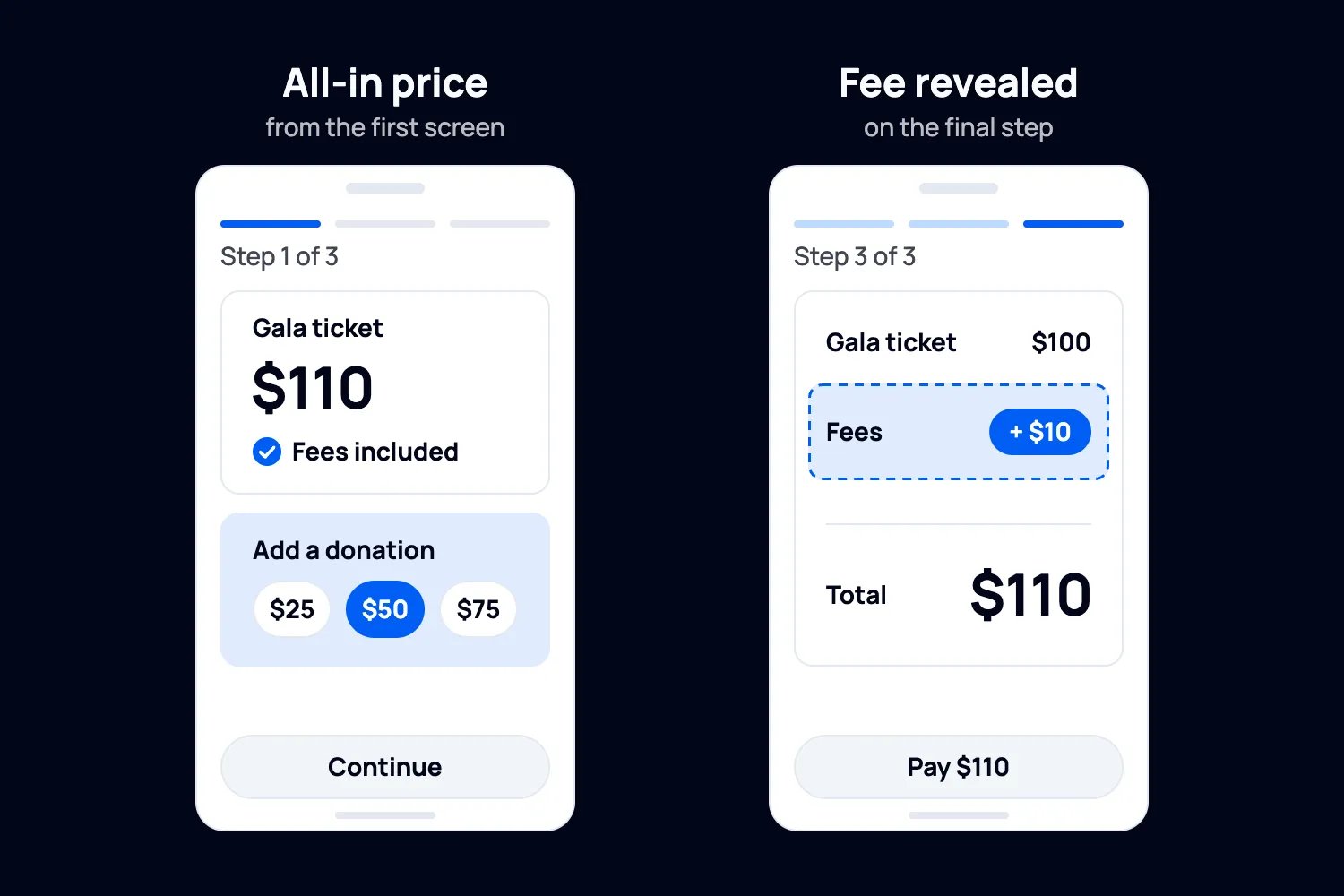
In Loopyah's November 2025 survey of 500 US event attendees, 48% selected unexpected checkout fees as a reason they'd abandoned a ticket purchase in the previous year. They could select up to three reasons. It gives you a very practical place to start: go through checkout and see when the full price becomes clear.
Use your phone and approach it as someone who's never booked with you before. Do you have to create an account? Can you use your preferred payment method? If payment fails, is it clear what happened? A declined payment shouldn't produce a valid paid ticket.
Then try the bookings your event will actually get. Someone might buy a table before they know every guest's name. Can those details be added later, or are you making the buyer collect everyone's dietary requirements before they can pay?
Look at any donation or platform-tip request too. The buyer should understand where that money goes and be able to decline it easily. A tip to the platform shouldn't look like a gift to your organization.
Clear labels and helpful error messages matter here. The W3C's accessible forms guidance recommends keeping forms short and making errors easy to understand. Try the checkout with a keyboard as well as on mobile.
With Loopyah's ticket checkout, supporters can buy without creating an account and pay by card, Apple Pay or Google Pay. You choose whether to absorb ticketing fees or pass them on.
6. Know who can access payments and supporter details
Your volunteers need to get people through the door. That doesn't mean they need access to donation amounts, financial reports or everyone's contact details. Start with what each person needs to do, then see whether the platform lets you give them that access.
Each staff member should have their own login, with multi-factor authentication where available. A door volunteer should be able to check a ticket without downloading your full supporter database.
For payments, you want card details handled by the payment provider, away from your own forms and spreadsheets. Find out who processes the payment and how checkout is hosted. The provider should be able to explain its compliance with PCI DSS, the card industry's security standard.
Using a provider still leaves you with responsibilities. The PCI Security Standards Council explains that you must confirm providers protect account data and understand who is responsible for what. Your processor or bank can explain what your team must complete.
The same practical approach applies to privacy. Collect the registration details you need, understand how the platform uses and stores them, and find out which other companies process them. The contract should explain what happens if there's a data breach and how you handle access or deletion requests.
You may need to keep transaction records longer than dietary answers. Decide what stays and for how long, then confirm how deletion works across the platform, backups, exports and connected systems.
7. Try check-in with the people who'll run your door
Now picture opening time. One volunteer is scanning tickets, another is looking up names, and the table host has arrived ahead of the rest of their guests. This is the setup you want to test.
Give two volunteers separate logins on the phones they'll use. Scan a QR code on one and find a guest by name on the other. Scan the same ticket again and see what both phones show. You'll want duplicate tickets caught before another person gets through.
Try a transferred ticket, a refunded ticket, unnamed table guests and a walk-up sale too. Pay attention to whether check-in applies to each guest or the whole order. The host arriving shouldn't mark all ten people at their table as present.
Next, find out what happens when the connection drops. If the platform supports offline check-in, how does it deal with conflicting scans when the phones reconnect? If you're using a downloaded list instead, decide who records arrivals and how the team avoids admitting the same ticket twice.
Loopyah supports QR scanning and name-search check-in, with door staff access limited to check-in. Our in-person checkout lets you sell tickets using tap-to-pay on a phone. Run through your own venue setup before opening time.
And find out who you can contact if something stops working. Support hours need to match your event's hours, including the time zone. Get clear on the contact channel, any event-day support charge and who can help with a failed payment or a volunteer who's locked out.

8. Think about the next conversation with each supporter
The event's over, but your relationship with the people who supported it carries on. Someone who donated without attending needs a different message from a first-time guest. A table host might be the person you want to speak to about next year's event.
This is where the earlier work on your records pays off. Try building those groups from the demo data. Can you find returning supporters, people who donated, guests who attended and ticket holders who didn't turn up?
Keep their permissions in mind. The table host's email isn't an address you can use to reach all ten guests, and buying a ticket doesn't automatically give permission for every fundraising campaign. Make sure preferences and unsubscribes carry across the systems you're using.
Here's what's useful about connecting attendance to follow-up: you can set up the thank-you before opening the doors. Loopyah supports email from your own domain, contact segments and attendance-triggered follow-up. You decide who should receive each message and make sure it meets the rules that apply to them.
Our post-event email examples can help you get started. Think about what each person did and what they'd expect to hear from you next.
Put it all together in one demo
Next, work through this booking together, using fictional supporter details and the vendor's test payment mode where available:
Buy two $100 tickets and add a $50 gift. Absorb the fees and add no tax for this test. The supporter pays $250, with the tickets and gift recorded separately. That total doesn't determine how much is tax-deductible.
Put a different attendee name on each ticket. You should have one purchaser, two tickets and two attendee records connected to the order.
Add a complimentary guest and try a declined payment. The guest should get a valid ticket; the failed purchase shouldn't.
Make another purchase as the same supporter. Bring the records into your donor CRM and see whether the order joins the existing contact without wiping their history.
Refund one $100 ticket from the first order while keeping the $50 gift, if that's an option your policy requires. The order should now retain $100 in ticket revenue and the $50 gift, with fees shown separately. Follow what happens to the receipt, ticket, capacity and refund records.
Try both volunteer phones, repeat a scan and attempt to use the refunded ticket. Export the final records and match a sample payout to its transactions. If test mode can't produce a payout, request a real example with private details removed.
Your eight-point scorecard
For each item below, record Pass, Workaround, Fail or Not required, plus what you actually saw. Keep the export, receipt, quote or report so you can compare vendors afterwards.
Data: your team can connect and import the contact, order, attendee and payment records.
Receipts: the platform supports the ticket, gift and benefit details finance needs.
Payouts and refunds: you can explain the deposit and carry out your refund policy.
Fees: the quote covers your sales volume, payment mix and required extras.
Checkout: supporters can buy on mobile, understand the price and recover from errors.
Security and privacy: responsibilities are clear and each person gets appropriate access.
Check-in: volunteers can admit guests, catch duplicate scans and use your connection fallback.
Follow-up: you can reach the right people using accurate records and appropriate permissions.
For each workaround, record who's responsible, the time and the cost per event. Have each team member review their part, including whoever handles finance, fundraising, event operations, privacy and security.
Agree which requirements you can't do without before comparing results. If a platform can't handle a refund you promise buyers, that needs resolving before you sign up, however much you like the registration page.
How Loopyah works for nonprofitsStart with one booking
Give each shortlisted vendor the same booking and have your team follow it through. You'll see where the platform helps, where someone has to step in and what it'll cost you to use it.

Author: By the Loopyah Content Team
The Loopyah Content Team shares expert insights, practical guides, and industry updates to help event organizers create unforgettable experiences and stay ahead in the event planning world.